 AgentPlays
Cancel Adobe and have Claude Code cut, caption and assemble a video in FilmCraft
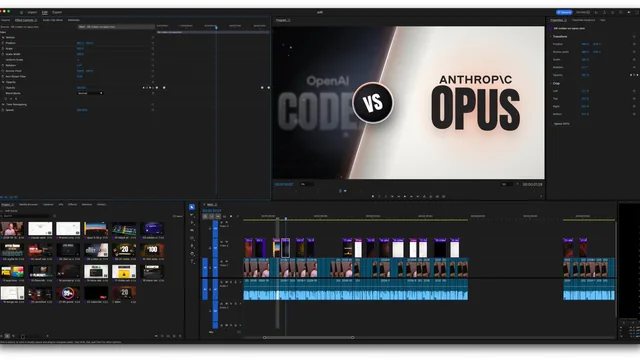
@thorgeirgisli cancelled Adobe and asked AI to edit a whole video. Claude Code cut the footage, made motion graphics, levelled the audio, fixed mic channels, wrote captions, then built the full project in FilmCraft, a free open-source editor. Screenshot of the FilmCraft timeline is in the post.
Try it yourself
What you get
A FilmCraft project with cuts, levelled audio, captions and motion graphics you can review before export.
Tools
- Claude Code
- FilmCraft (free, open source)
- Your raw video clips
Steps
- Put the raw clips in a folder Claude Code can read.
- Ask for cut, audio fix, captions and motion graphics in FilmCraft format.
- Open the project in FilmCraft and scrub every section.
- Export only after you approve the cut.
Copy-ready prompt
Edit this video folder into a FilmCraft project. Cut to the story, level the audio, fix mic channel issues, write captions, and add simple motion graphics. Save the FilmCraft project so I can review every change. Do not export a final file until I say so.
Watch out: Always watch the full cut. AI can mis-hear names in captions.
Proof / source
Self-reported Author's public X post with FilmCraft screenshot (Oct 12, 2026). Self-reported.
In their words
I cancelled Adobe and tried to have AI edit my whole video. Claude Code cut it, made the motion graphics, levelled the audio, fixed the mic channels and wrote the captions. Then it built the full project in FilmCraft, which is free and open source... I'm stunned
Related
Dictate Claude Code prompts with local Whisper so text lands at the cursor
@_Julsgaard_ stopped typing Claude Code prompts. They hold Ctrl+Space, speak, and local Whisper on their Windows PC drops the text at the cursor. They open-sourced it as …
Build a custom workout app for a partner with Claude Code and Cursor
@RubeBuilds's wife liked the Strong app but wanted different features plus routines pulled from Reddit. @RubeBuilds built their wife a workout app with Claude Code, plus …
Get an AI second opinion on your MRI with Claude Code
A shoulder-pain patient gave the DICOM files from their MRI to Claude Code (Opus 4.8). It read the tendon as intact where the clinic had reported a partial tear, then com…
Build your own assistive-tech Mac app with Claude Code
A developer with spinal muscular atrophy, who can't use a scroll wheel, used Claude Code with the GSD workflow to build Scroll My Mac: a free macOS app that scrolls any a…