 AgentPlays
Convert HTML to Markdown on a CPU with Microsoft MarkItDown
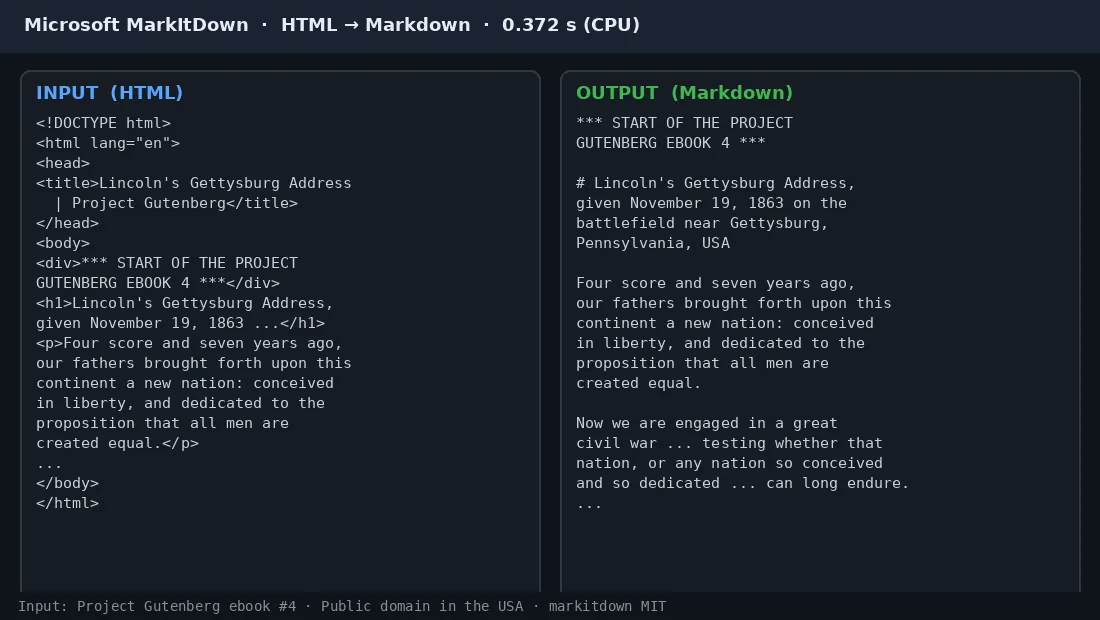
We tested Microsoft MarkItDown 0.1.8 on Oct 15: it converted Project Gutenberg ebook #4 (Lincoln's Gettysburg Address, HTML) to Markdown in 0.372 s wall-clock on an 8-vCPU Intel Xeon, CPU only. The title became a Markdown heading and the body became plain paragraphs. MarkItDown is MIT; the ebook is public domain in the USA.
Try it yourself
What you get
Clean Markdown from an HTML page, ready for an AI pipeline or notes app.
Tools
- Microsoft MarkItDown (MIT)
- Python package markitdown 0.1.8
Steps
- Install it with pip install markitdown (we used markitdown 0.1.8).
- Run python -m markitdown input.html -o output.md on your HTML file.
- Open the Markdown and check headings, lists and tables by hand; we only tested one Gutenberg HTML page.
- For PDF, Word, PowerPoint and other formats, install the extras with pip install 'markitdown[all]'; we only timed HTML → Markdown.
Watch out: MarkItDown is MIT. Input was Project Gutenberg ebook #4 (public domain in the USA). One HTML page only; other formats were not timed.
Proof / source
Tested by AgentPlays Our own test on Oct 15, 2026, on an 8-vCPU machine, CPU only: Project Gutenberg ebook #4 HTML in, Markdown out, and a timing log.
Read the original source ↗ Discussion ↗
Related
Remove an image background on a CPU with rembg
We tested rembg on Oct 15 with a self-made test image: a red circle with a yellow square on a green background. rembg (MIT) with the u2netp model (Apache-2.0, from U-2-Ne…
Read an upside-down, blurry page scan with Indra OCR on a CPU
We tested Indra OCR (first published Oct 10–13) on an 8-vCPU Intel Xeon, CPU only. We gave it a page rotated upside down, blurry and grainy: page 1 of the TheoPhysEval pa…
Let your AI agent do the bookkeeping legwork in Dougs while you approve every change
Tom Eberle open-sourced dougs-cli (MIT), an unofficial command-line tool for the French accounting platform Dougs, so an agent can work in their company's books. On their…
Get a second opinion on a $1,800 car repair quote from the shop's own inspection video
After a routine service, a shop recommended about $1,800 of work on Kyle Blanchard's Mazda and sent an inspection video. They gave an AI agent a photo of the quote and th…