 AgentPlays
Ask Grok Bot to connect your Mac's Apple apps: Reminders, Calendar, Notes, Contacts and Messages
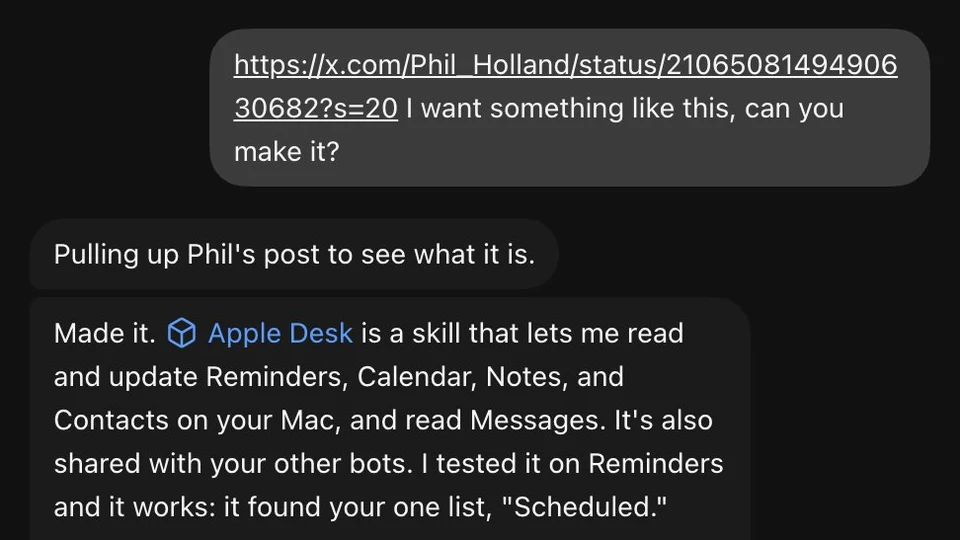
@madebydia had put a lot of effort into connecting their Apple apps to other assistants. Following an idea from @Phil_Holland, they sent Grok Bot @Phil_Holland's post and asked for something like it. Grok Bot made Apple Desk, a skill that reads and updates Reminders, Calendar, Notes and Contacts on the Mac and reads Messages, and tested it on Reminders. In the screenshot it says it won't send a text without approval of the exact wording, and that macOS asks for permission the first time each app is used.
Try it yourself
What you get
A Grok Bot skill that reads and updates your Mac's Reminders, Calendar, Notes and Contacts and reads Messages, with you approving any text before it goes out.
Tools
- Grok Bot (Mac app)
- Apple Reminders, Calendar, Notes, Contacts and Messages
Steps
- Share an example of the setup you want with your Grok Bot and ask it to build something like it.
- Let it create the skill, then approve the macOS permission prompt for each Apple app the first time it is used.
- Grant Full Disk Access to the Grok Bot app only if you want it to read Messages.
- Test on one app first, such as Reminders, and approve the exact wording of any text before it is sent.
Copy-ready prompt
Make me a skill that can read and update my Reminders, Calendar, Notes and Contacts on this Mac, and read my Messages. Never send a message without showing me the exact wording first. Test it on [ONE APP] and tell me which macOS permissions it will need.
Watch out: Reading Messages needs Full Disk Access for the Grok Bot app. Grant only the access you need, and approve every outgoing text.
Proof / source
Self-reported Author's public X post with a screenshot (Oct 14, 2026), crediting @Phil_Holland's post for the idea. Self-reported.
In their words
Phil's post reminded me how much effort I've put into trying to connect my Apple apps to other assistants My Grok Bot just... did it
Related
One owner's setup: connect your own Tesla to Grok Bot through Tesla's official Fleet API
@Chansoo connected their own Tesla to their Grok Bot so it can do what the Tesla mobile app does. They made a free personal developer app on Tesla's official Fleet API, k…
Ask Grok Bot to check a download on its own computer before you install it
@AccessTips asked Grok Bot whether something they wanted to download was safe and not a fake. Before answering, Grok Bot said: "I'm downloading the installer onto my comp…
Another game made with Grok Bot: Lantern Forest
@Aiofbeauty shared Lantern Forest: Night of Courage on Game Jolt, saying it is "Another game made with grok bot". The post shows the game's banner art.
Have Grok Bot vibe-code offline browser games to play on a flight
@chriszeuch used Grok Bot to vibe-code two offline games to play during a flight and made them public so anyone can play. The post shows Coin Dash (a runner) and Crown Su…