 AgentPlays
One owner's setup: connect your own Tesla to Grok Bot through Tesla's official Fleet API
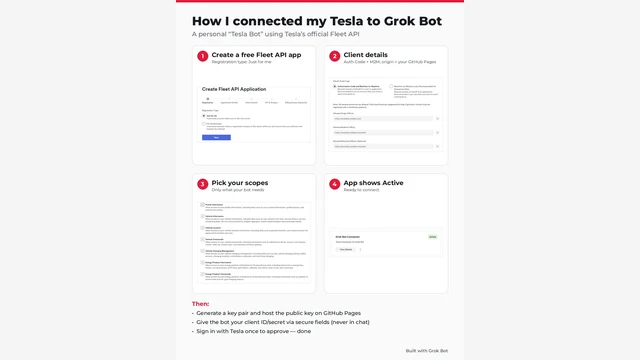
@Chansoo connected their own Tesla to their Grok Bot so it can do what the Tesla mobile app does. They made a free personal developer app on Tesla's official Fleet API, kept the private key on the bot's computer, hosted the public key on a free GitHub Pages site, gave the bot the app's client ID and secret through secure fields (never in chat), signed in to Tesla once to approve access and paired the key with the car. They say the bot can check battery, range, charging and lock status, run climate and charging, send a destination to the nav and send alerts, asking first for anything sensitive.
Try it yourself
What you get
Your Grok Bot can check and control your own Tesla the way the Tesla app does, asking you first for anything sensitive.
Tools
- Grok Bot
- Tesla Fleet API (personal developer app)
- GitHub Pages (to host the public key)
Steps
- In Tesla's developer portal, create a Fleet API app with the registration type "Just for me" and pick only the scopes your bot needs.
- Generate a key pair, keep the private key on the bot's computer, and host the public key where Tesla can verify it (they used GitHub Pages).
- Give the bot the client ID and secret through secure fields, never in chat, then sign in to Tesla once to approve access and pair the key with your car in the Tesla app.
- Have the bot ask you before unlocking, opening the trunk or any other sensitive command.
Watch out: This is one person's setup for their own car, not a shared service. Tesla's Fleet API terms don't allow passing car data to third parties, so use it only for your own car and don't offer it to others. Grant only the scopes you need.
Proof / source
Self-reported Author's public X post with a step-by-step guide image (Oct 14, 2026). Self-reported.
In their words
I built a Tesla Grok Bot to do all the things I can do on my Tesla mobile app
Related
Ask Grok Bot to check a download on its own computer before you install it
@AccessTips asked Grok Bot whether something they wanted to download was safe and not a fake. Before answering, Grok Bot said: "I'm downloading the installer onto my comp…
Ask Grok Bot to connect your Mac's Apple apps: Reminders, Calendar, Notes, Contacts and Messages
@madebydia had put a lot of effort into connecting their Apple apps to other assistants. Following an idea from @Phil_Holland, they sent Grok Bot @Phil_Holland's post and…
Another game made with Grok Bot: Lantern Forest
@Aiofbeauty shared Lantern Forest: Night of Courage on Game Jolt, saying it is "Another game made with grok bot". The post shows the game's banner art.
Have Grok Bot vibe-code offline browser games to play on a flight
@chriszeuch used Grok Bot to vibe-code two offline games to play during a flight and made them public so anyone can play. The post shows Coin Dash (a runner) and Crown Su…